
Agents
Configure the voice, instructions, knowledge, and behavior used during calls.
Agents define how OutCallerAI speaks and behaves. An agent can be reused across use cases, while use-case configuration controls who is called and when.
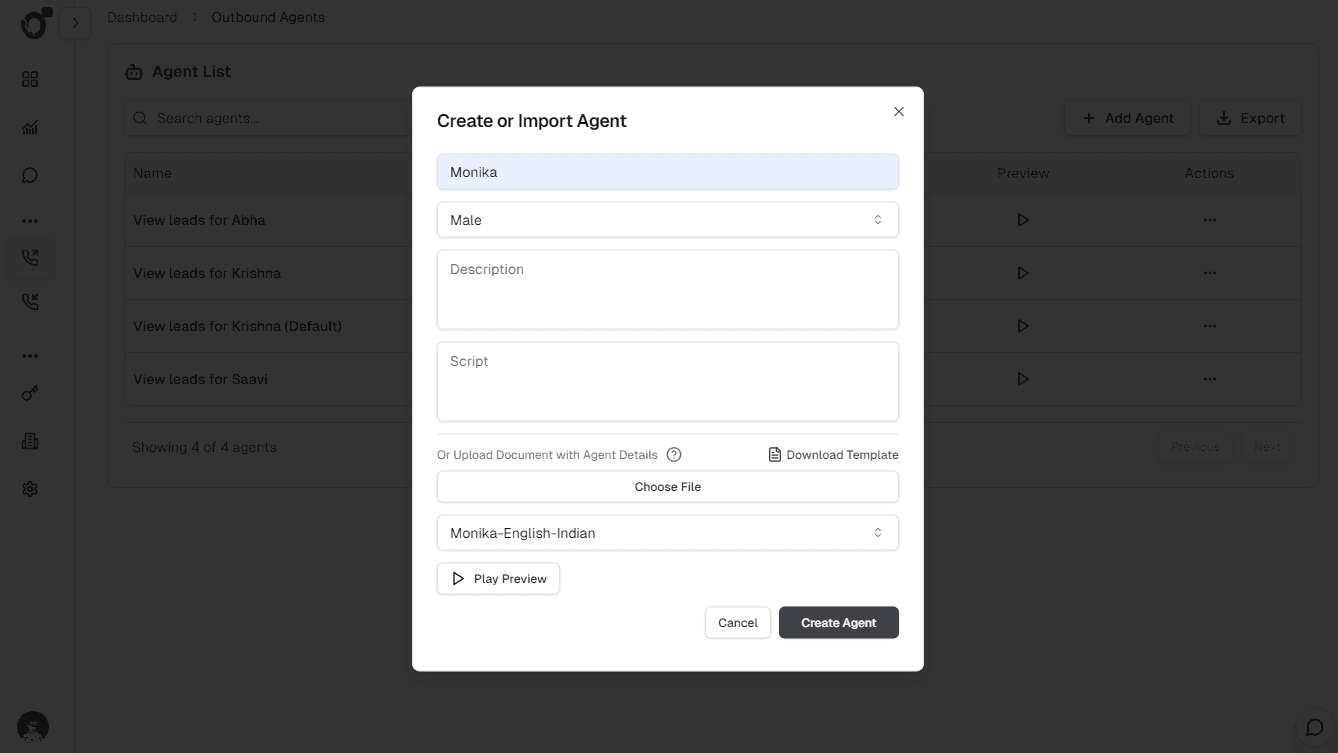
Create an agent
- Open a use case and select Add agent.
- Give the agent a recognizable operational name.
- Select and preview the voice.
- Add the instructions or script that define the objective and boundaries.
- Save the agent, then test it before assigning production leads.
Agent configuration also includes turn-taking behavior such as whether the agent speaks first, interruption handling, voice activity detection, and timing thresholds. Change these controls only when testing shows a concrete conversational problem; overly aggressive interruption or endpoint settings can make natural speech feel clipped.
Write effective instructions
- State the call objective in the opening paragraph.
- Describe the information the agent must collect or confirm.
- Specify what the agent should do when the customer is unavailable, confused, or asks to stop.
- Keep business facts in the knowledge base instead of copying them into every prompt.
- Include a clear completion condition so the conversation ends naturally.
Structure instructions in the order the agent needs them: role and objective, opening behavior, information to collect, decision rules, escalation or scheduling behavior, prohibited actions, and completion criteria. Use direct language and define ambiguous business terms.
Do not place credentials, private access tokens, or unrestricted internal data in agent instructions. If the agent needs factual content, connect a scoped knowledge base. If it needs to perform an action, use a supported integration or tool with workspace-managed credentials.
Voice and language
Preview the chosen voice with representative names, numbers, and domain terminology. Language, pace, and pronunciation should match the audience and the content of the use case. A voice that sounds good in a short preview can still perform poorly with abbreviations or mixed-language scripts, so validate it with a complete test conversation.
Before going live
- Preview the selected voice.
- Run test conversations covering the happy path and common objections.
- Confirm the knowledge sources are current.
- Verify transfer, webhook, and scheduling integrations if the workflow uses them.
After publishing a change, review a small set of new conversations before comparing aggregate dashboard results. Evaluations can provide a repeatable regression check for important personas and scenarios.
How is this guide?